Hashnode Integration
Last Updated: Recently
Your blog, your domain, our editor.
Hashnode is the preferred platform for developers who want a custom domain (e.g., blog.texavor.com) without the headache of hosting. Texavor connects via their GraphQL API to push content instantly.
Features
- Canonical Safety: We set the
originalArticleURLfield in Hashnode's database to your primary domain. - Custom Domains: Works seamlessly with standard (
hashnode.dev) or custom domains. - Series Support: Link articles to a Hashnode Series.
1. Get Settings from Hashnode
- Go to Hashnode Developer Settings.
- Access Token: Click "Generate New Token". Copy it.
- Publication ID:
- Go to your Blog Dashboard.
- The ID is in the URL:
hashnode.com/{PUBLICATION_ID}/dashboard. - Copy this ID.
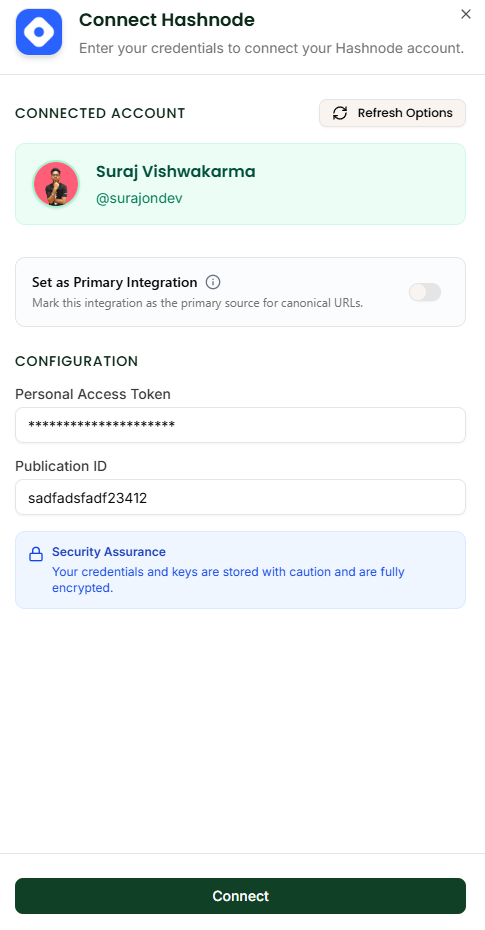
2. Connect in Texavor
- Navigate to Integrations.
- Click Connect on the Hashnode card.
- Enter your Access Token and Publication ID.
- Click Verify. We will fetch your blog title to confirm access.
3. Publishing Workflow
When you click Deploy:
- Select [x] Hashnode.
- (Optional) Series: Select an existing Series from the dropdown (we fetch these live).
- Slug: You can override the URL slug if needed.
FAQ
Q: Does it support Team Publications? A: Yes. Just use the Publication ID of your Team Blog. The Access Token must belong to an Admin of that publication.
Q: Do images transfer? A: Yes. We upload your images to Hashnode's CDN automatically so they load fast.