The Editor
Last Updated: Jan 12, 2026
Write like a human. Optimize like a machine.
The Texavor Editor is a "Focus Mode" environment that supports full Markdown and provides real-time feedback on your content's quality.

1. The Toolbar
Highlight any text to reveal the Formatting Toolbar.
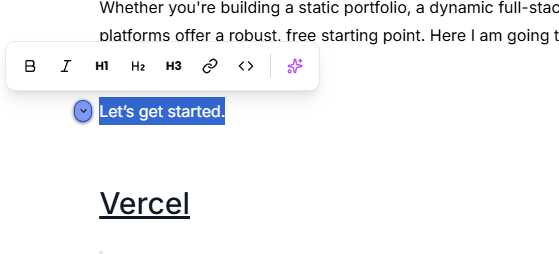
- B / I: Bold and Italic.
- H1 / H2 / H3: Heading structures.
- Link: Hyperlink manager.
- Code (
<>): Inline code or code blocks.
2. Content Insights (The Sidebar)
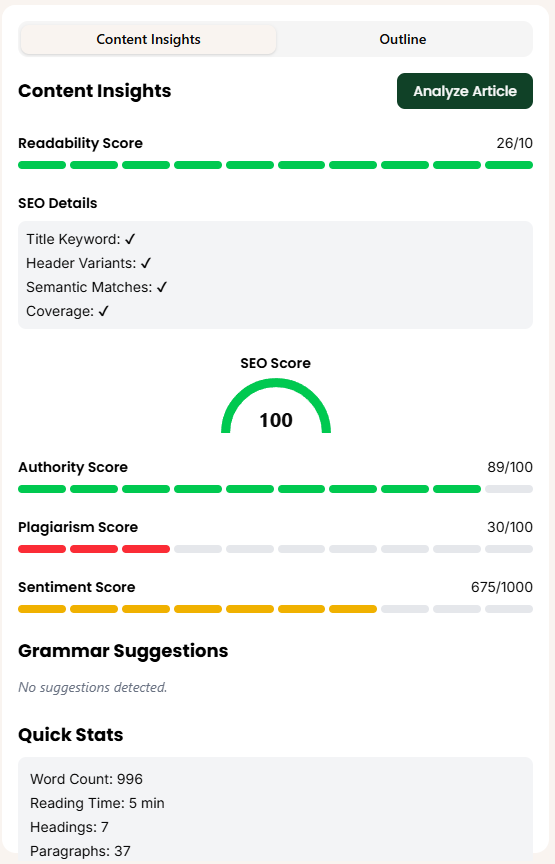
Click Analyze Article to run the full comprehensive scan. This is not just a spell-checker; it is a publication-readiness audit.
The Metrics
- Readability Score (0-100): Measures sentence complexity. Aim for >60 for general audiences.
- SEO Score (0-100): A composite score checking:
- Title Keyword: Is the primary keyword in H1?
- Header Variants: Are H2/H3s structured correctly?
- Semantic Matches: Are you using LSI keywords (synonyms)?
- Authority Score: Checks if you are citing external sources vs internal links.
- Plagiarism Score: Checks against 50B web pages to ensure uniqueness.
- Sentiment Score: Detects the emotional tone (Positive/Neutral/Negative).
Quick Stats
At the bottom, you can see live Word Count, Reading Time, and Heading Depth.
3. Export & Download
- Markdown: Copy raw markdown for use in VS Code or Obsidian.
- HTML: Copy clean HTML for legacy CMSs.
- PDF: Download a print-ready version.
Support & Resources
Need help publishing your content strategy?
- 📧 Email Support: hello@texavor.com
- 📚 Documentation: Browse the full guide